Clinical notes from the visit
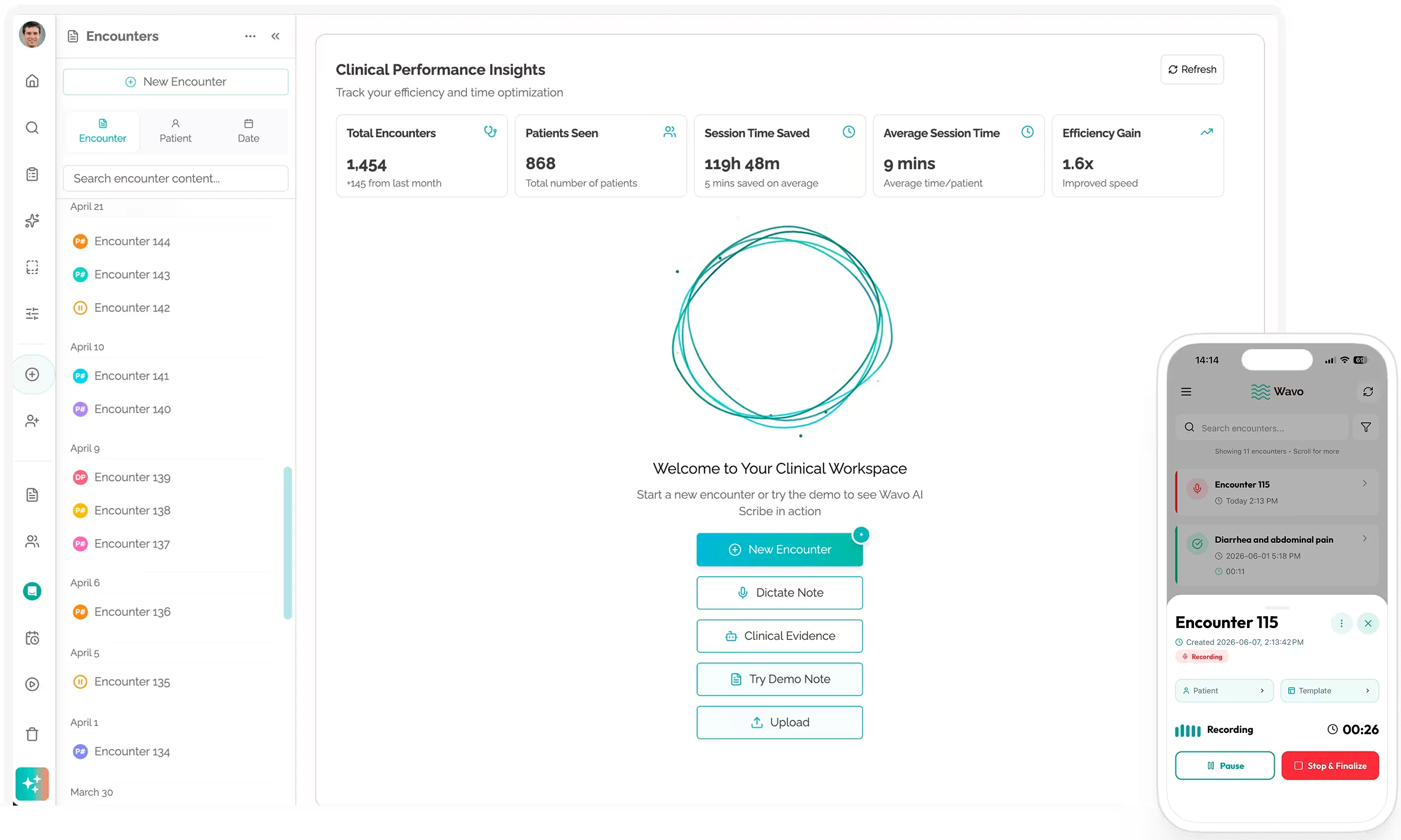
Hit record and talk with your patient. When the visit ends, Wavo produces a structured clinical note tuned to your specialty, not generic boilerplate.
Meet the Wavo Clinical Assistant: cited clinical answers right next to your notes. Meet the Wavo Clinical Assistant: cited clinical answers right next to your notes.Learn more
Platform overview
Capture the visit, write the note, surface context, suggest codes, and export to your EHR — all in one place.
01 · Ambient AI Scribe
Press record, talk naturally, and let Wavo capture the clinical story. It uses the vocabulary and note structure your specialty expects, so you can stay with the patient instead of the keyboard.
Hit record and talk with your patient. When the visit ends, Wavo produces a structured clinical note tuned to your specialty, not generic boilerplate.
Watch the transcript build as the conversation unfolds. Wavo handles medical terminology, drug names, and specialty language so the raw visit stays usable.
Generate the visit summary, follow-up actions, and prescription details from the same encounter, ready to share or paste into your EHR.
Wavo separates clinician, patient, and family member voices so the transcript reflects the real conversation.
Capture virtual visits on Zoom, Teams, or Google Meet. After the call, Wavo processes the audio and delivers a structured clinical note.
02 · Dictation
Prefer to dictate? Speak your note after the visit, or upload a recording from your phone or dictation device, and Wavo turns it into a clean, formatted clinical document.
Prefer to dictate after the patient leaves? Speak naturally and Wavo turns your dictation into a clean, formatted clinical document.
Already recorded a session on your phone or dictation device? Upload the audio and Wavo turns it into a complete note.
03 · Templates
No two clinicians document the same way. Wavo adapts to your specialty, format, and editing habits so generated notes get closer to your style over time.
Create your own templates from scratch. Define sections, set instructions for how Wavo fills each one, and save them for every future encounter.
SOAP, H&P, progress notes, discharge summaries, psychiatric evaluations - choose the format you need and start documenting immediately.
Use pre-built template sets for 80+ specialties. Cardiology gets the right cardiac language; psychiatry gets the right mental health structure.
Browse templates shared by thousands of clinicians. Filter by specialty, sort by rating, and install with one click. Found a great one? Share yours back.
Tell Wavo to make the note more concise, switch to bullets, or adjust the tone. The edit happens instantly, without rewriting the note yourself.
Restructure a generated note, change the level of detail, reorder sections, or request a specific change without starting over.
04 · Clinical Intelligence
Wavo helps you see patient context before, during, and after the encounter. Ask clinical questions, review evidence, attach outside documents, extract metrics, and keep the note grounded in the record.
Ask about drug interactions, contraindications, evidence summaries, dosing, or practical guidance in plain language, with citations visible in your workflow.
See recent encounters, problems, medications, and trends before the patient walks in. Fewer surprises, clearer agendas, and visits that feel continuous.
Upload labs, consult notes, imaging reports, referrals, or other files. Wavo pulls out key facts so prep and documentation stay grounded in the record.
Vitals, BMI, blood pressure, glucose levels, medication dosages — Wavo detects and structures health metrics mentioned in the conversation so you don't have to enter them manually.
Medication names, dosages, frequency, duration, and refill counts are extracted automatically from the encounter recording and organized into a structured prescription list.
Track encounters completed, patients seen, hours saved, and average session time so you can see where documentation time is going.
Every correction teaches Wavo what you prefer. Over time, generated notes need less cleanup.
05 · Editor & Export
Use Wavo as the workspace between the visit and the EHR. Edit the note, keep scratch thoughts, attach files, create patient-facing documents, and copy or export the final version.
Edit the AI draft like a real document, with headings, lists, formatting, and structured sections that match how your group documents.
Generate clean, formatted note text and paste it straight into your EMR fields. Start closing charts without waiting for a custom integration.
Capture quick reminders, phone scores, or interim phrases while the encounter is still open—then fold what matters into the final note when you're ready.
Keep PDFs, images, and supporting documents alongside the note so your team has the full picture in one place—not scattered across downloads and inboxes.
Export finalized notes as PDFs for e-fax, medicolegal archives, or patient handouts—or copy structured blocks for billing and referral packets.
From one encounter, produce a SOAP note, patient letter, and referral narrative in parallel without dictating the same visit three times.
06 · Patient Management
Folders, dashboards, timelines, search, and bulk actions help keep your panel manageable, whether you run a solo practice or a growing clinic.
See recent encounters, open tasks, and key documents at a glance so you never start the next visit cold.
Group notes, attachments, and exports by patient so audit prep and handoffs stay coherent for partners and staff.
Scroll a longitudinal narrative built from past visits—ideal for complex patients where the arc of care matters as much as today's vitals.
Sort and filter every visit from a structured grid—jump back to last week’s note or bulk-select charts for QC in seconds.
Find patients, snippets, or ICD mentions across your workspace with AI-aware search that respects clinical context.
Tag, export, or archive many encounters at once so administrative cleanup does not eat another evening.
07 · Coding Support
Wavo surfaces E/M, ICD-10, and HCC considerations from the same encounter it documented, so codes stay tied to what happened in the room.
Get guidance on evaluation and management level based on the problems, data, and risk reflected in your note and transcript—so visit complexity matches the documentation.
Suggested diagnosis codes drawn from the encounter narrative, ready for your review and attestation before billing or reporting.
Hierarchical Condition Category–relevant conditions surfaced for value-based care and risk adjustment workflows—so capitated arrangements reflect documented chronic burden.
08 · Security & Compliance
Wavo is built around HIPAA, PIPEDA, encryption, access controls, audit trails, and retention settings so recordings and notes are handled with care.
Data handling, subprocessors, and BAAs are structured around US and Canadian healthcare privacy expectations—documented for your security reviews.
Industry-standard TLS protects traffic; encrypted storage safeguards transcripts and notes while they reside in Wavo’s infrastructure.
Connect your identity provider so clinicians sign in with the same MFA-backed credentials they already use for the hospital or clinic.
Trace who viewed, exported, or edited sensitive charts so governance and risk teams get the receipts they need.
Align how long audio and text are kept with your policy—supporting chart-completion workflows without dangling copies forever.
Team and organization roles limit who can open which encounters—so students, billers, and partners only see what they should.
09 · Multi-Platform
Use Wavo in clinic, in hospital, from home, or between rooms. Web, mobile, Chrome, and EHR-side workflows keep documentation close to where you work.
Record encounters, review notes, and keep up with documentation from iPhone or iPad between exam rooms.
Use the same AI scribe, templates, and intelligence tools from your Android phone or tablet.
Open Wavo in a side panel alongside your EHR. Record and document encounters without switching tabs or leaving your existing workflow.
Use Wavo alongside your existing systems and populate charts in the tools you already use. Clinicians across the US and Canada rely on Wavo next to Epic, Cerner, athenahealth, OSCAR, TELUS PS Suite, and other leading EMRs.
Install Wavo from your browser for a fast, app-like workspace with home screen shortcuts.
Manage users, shared templates, and organization-wide settings for solo practices, clinics, and larger teams.
Full interface and transcription support in English, Spanish, and French. Set the language per document so multilingual encounters are documented accurately.
Start a free trial and see how much faster a patient conversation becomes a chart-ready note.
Start Free TrialNo credit card required · Cancel anytime